Black Centered - BLK Maker
- 3.6
- Rating
- 100.00K
- Installs
- Free
- Price

 Analysis by App-foxy
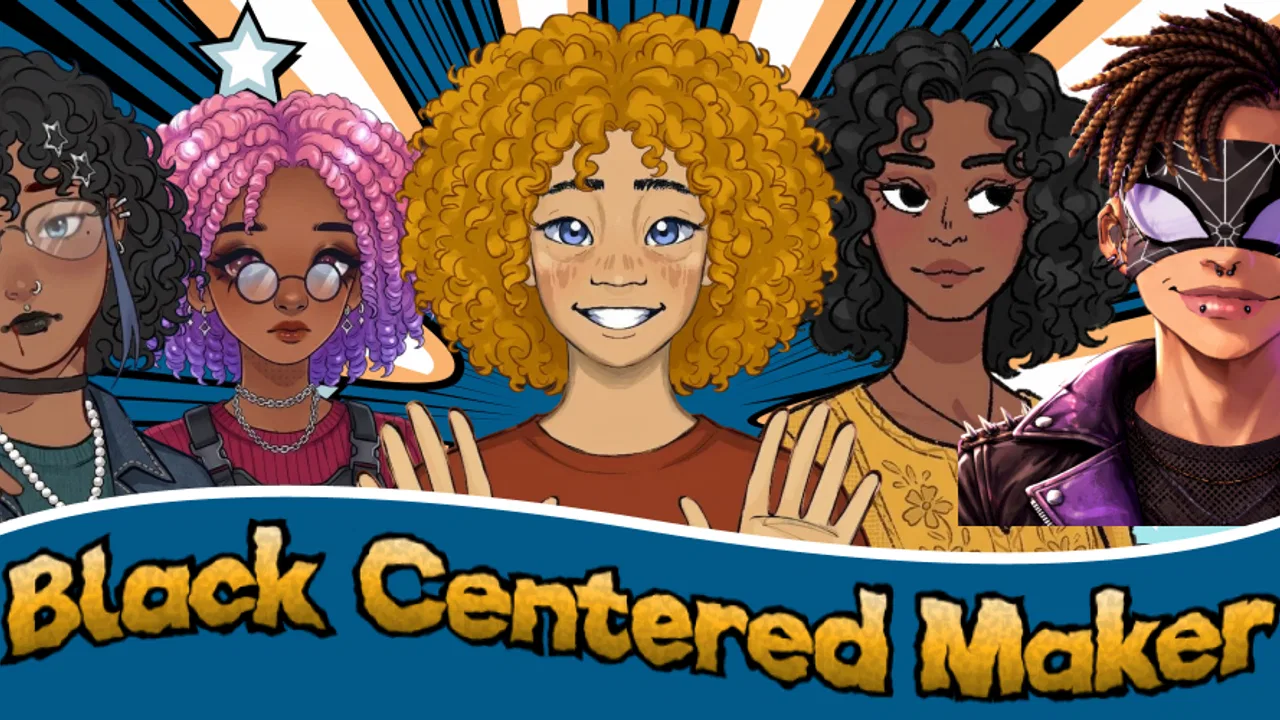
Black Centered - BLK Maker is a free art and design app from AthenaHotC built around one clear idea: creating a customizable Black-centered character. I found it more focused than a general drawing program, and that focus is exactly what makes it approachable. Instead of opening a blank canvas and wondering where to begin, I could start with a character concept and spend my time shaping its appearance.
The app is aimed at people who want a quick visual identity for a profile, story idea, mood board, personal project, or simply a character they can make their own. Its age rating is Everyone, so the concept is easy to understand across a wide audience. It is also free, which makes trying it a low-risk decision for anyone curious about character creation on a phone.
What matters most here is not the size of the toolset, but the way the app narrows the creative task. BLK Maker turns character design into a guided customization process rather than a drawing lesson. That can be liberating when I want a result quickly, although it also means the app is not a replacement for a full illustration studio.
You May Also Like

 Blood Strike: 2.5 Anniversary
Blood Strike’s Loadouts Turn Every Drop Into a Tactical Gamble
A close look at Blood Strike’s custom loadouts: how fast access to signature weapons reshapes its battle royale rhythm, rewards preparation, and narrows the gap between fights.

 Pandora - Music & Podcasts
Pandora’s Music Is Easy to Start, but Harder to Recover
Pandora’s strength is its low-effort path from a seed to a station. Its weak spot is how much confidence it asks you to place in connection, setup, and quiet recovery.

 8 Ball Pool
8 Ball Pool Is Built on Rivalries, Rematches, and Routine
A close look at the rivalries, rematches, shared routines, and unanswered safety questions that turn a quick pool match into a persistent mobile community.

 Samsung Music
Samsung Music’s Quiet Strength Is Playing What You Already Own
Its reach comes less from spectacle than from dependable access to a personal library. That simplicity is both the app’s strongest retention engine and its ceiling.

 AccuWeather: Weather Radar
AccuWeather Review: A Quick, Clear Forecast for Everyday Decisions
For everyday plans, the best forecast is the one you can understand quickly. AccuWeather makes rain timing, radar, and local conditions easy to act on, with a few trade-offs.

 Hill Climb Racing
Why Hill Climb Racing Still Turns Crashes Into One More Run
A tiny car, a bumpy hill and one more upgrade: Hill Climb Racing keeps resurfacing because its simple chaos makes every near-miss feel personal.
More From Our News Desk



Customization is the reason to use it
I’d approach this section by looking at how the app’s focused character-making process fits into short, everyday sessions, especially when I’m creating on a phone rather than settling in for a full drawing project. That practical context also makes it easier to weigh what I gain from a guided workflow against the flexibility I might want from a broader art tool.
A focused starting point for character ideas
Many art apps begin with an empty page. That is useful for experienced artists, but it can be intimidating when I only have a rough idea in mind. This app takes the opposite route. Its Black-centered character concept gives the project a visual direction from the beginning, so I can concentrate on choices and personality instead of first constructing every basic element myself.
That distinction changes how the app feels in everyday use. I would not open it expecting to paint a detailed scene, edit a photograph, or build a complete comic page. I would open it when I want to explore what a character could look like and make several visual decisions without committing to a long drawing session.
The strongest part of the experience is the sense of ownership that comes from customization. A preset character can feel generic, but adjusting the available details makes the result more personal. Even when the process is simple, small changes can shift the mood of the character from casual to confident, playful to serious, or ordinary to more distinctive.
I also appreciate that the concept is specific rather than trying to serve every possible art style at once. The focus gives the app a recognizable purpose. Someone searching for a character maker with Black representation is likely to understand its appeal immediately, while someone wanting an unrestricted avatar builder may find the direction narrower than expected.
Why the focused concept has real value
Representation is not just a label attached to the app. It affects who can use the result as a more natural reflection of themselves or of the characters they imagine. For a young creator, a casual social profile, or a writer developing a cast, having a starting point centered on Black characters can make the creative process feel more relevant than relying on generic options.
I see particular value in using the app as a visual thinking tool. A writer might have a character personality but no clear appearance. A student could use a character in a presentation or personal project. Someone planning a digital story could create a rough visual reference before moving to a more advanced art program. In each case, the app helps turn an abstract idea into something visible.
There is also a useful difference between making one polished image and exploring possibilities. I would use the app to test several directions: a different look for the same fictional person, variations for a group of characters, or a quick comparison between a softer and more dramatic design. That kind of experimentation is easier when the app handles the basic construction and leaves me to make the meaningful choices.
How it works in practice
The practical workflow is best understood as a sequence of visual decisions. I begin with the character concept, then work through the customization choices available in the app. Rather than treating each selection as an isolated decoration, I try to keep a simple purpose in mind: what should this character communicate at a glance?
For example, I might first decide whether the character should feel relaxed, energetic, formal, or imaginative. Then I can judge each available adjustment against that idea. This is more effective than changing everything randomly, because a character can quickly become visually busy when every option is selected without a consistent direction.
One useful habit is to make a basic version first and pause before adding more changes. The first result gives me a reference point. From there, I can alter one visual aspect at a time and notice which change actually improves the character. This makes the app more useful for design exploration and avoids losing track of why a particular version worked.
I would also save or export a preferred result as soon as I reach a version I like, if the surrounding workflow offers that option on the device. That is a practical precaution when experimenting with multiple variations. It is much easier to compare a few deliberate versions than to repeatedly rebuild a character from memory.
Small workflow choices that improve the result
The first non-obvious tip is to design for the final viewing size. If the character will appear as a small profile image, subtle details may disappear, while a strong silhouette or clear contrast will remain readable. If the image is intended for a larger personal project, I can afford to judge the design more closely. The app is therefore not only about what looks attractive on the editing screen; it is about what survives when the image is actually used.
A second useful approach is to create a small set of related characters instead of endlessly perfecting one. Keeping a shared visual direction while changing individual choices can help when building a story cast, a group illustration, or a themed collection of avatars. The app’s focused concept makes this kind of variation more manageable than starting every character from a blank canvas.
A third insight is to treat the character as a communication device, not just an attractive picture. Before making a final version, I ask what a viewer should notice first. Is the character meant to look approachable, bold, creative, or mysterious? That question helps me choose details with intention and prevents the final image from becoming a pile of disconnected options.
The app is also suitable for quick sessions. I can use it when I have only a few minutes and still leave with a concrete visual outcome. That is a meaningful advantage over traditional drawing software, where opening the canvas may be the easiest part and completing something recognizable can require much more time.
A realistic everyday scenario
Imagine I am preparing a small online project and want a personal character to represent it. I do not need a full illustration, animation, or carefully painted background. I need a visual identity that feels more personal than a random icon. I could open BLK Maker, create a character that matches the tone of the project, test a few versions, and use the strongest one as a reference while I work on the rest.
Another realistic situation is a parent or teacher looking for a simple creative activity. Because the app falls into the Art & Design category and carries an Everyone rating, it can be an accessible way to discuss character choices, identity, and visual storytelling. The activity does not require someone to know how to use layers, brushes, or complex editing panels. The creator can focus on explaining why a character looks a certain way.
For a writer, the app can work as a lightweight character board. I might create one image for a protagonist, then another for a supporting character, using the differences between them to clarify their roles. The results may not replace professional concept art, but they can make a fictional cast easier to imagine and discuss.
I can also see it helping someone who wants a fresh profile image but does not want to use a photograph. The benefit is not realism; it is controlled self-expression. A customized character can communicate something about the user while remaining separate from their real-world appearance.
Where it differs from ordinary art apps
Compared with a general drawing app, this one removes much of the technical overhead. In a drawing program, I would usually need to build the character manually, manage the composition, and make sure the proportions and visual details work together. That offers far more freedom, but it also demands more time and skill. BLK Maker is better when the goal is a recognizable character concept rather than a fully authored illustration.
Compared with a broad avatar creator, its Black-centered direction is more meaningful and specific. A general avatar app may offer a wider range of themes or unrelated customization categories, but that variety can make the experience feel less focused. Here, the identity of the app is clear from the beginning, which is an advantage for the audience it serves.
The trade-off is that users who want many unrelated aesthetics may feel constrained. If I am looking for fantasy creatures, detailed costume design, realistic portrait controls, or a complete social-avatar platform, I would investigate other options first. This app makes more sense when its central character concept matches what I want to create.
Limitations I noticed in the overall approach
The same simplicity that makes the app approachable can limit the depth of the finished work. A guided character maker cannot offer the same control as a professional illustration tool, especially for people who want to draw custom poses, build environments, or refine tiny visual details. I would use it as a starting point, a quick creator, or a reference generator rather than as my only art application.
There is also a risk of repetition if I expect every result to feel completely different. A focused app can provide meaningful variation within its design language, but it is not necessarily intended to generate unlimited visual worlds. The more specific my artistic brief becomes, the more likely I am to need another tool afterward.
Another point to consider is the difference between customization and authorship. Choosing from available options gives me control, but it is not the same as drawing every feature myself. That distinction matters for artists who want their hand visible in every line. For them, this app may be useful during brainstorming, but not satisfying as the final creative destination.
The rating sits at a 3.6 average from around 646 ratings, with around 35 written reviews. I read that as a sign to keep expectations realistic: the idea clearly appeals to a substantial group, but it is not an automatic recommendation for every art enthusiast. I would try it because it is free, then decide whether its particular style and level of control fit my needs.
Device and access considerations
The app is available for Android devices running version 7.0 or later, and its current version is 1.1.0. That gives it a relatively broad reach for people using older compatible phones, although the actual comfort of editing will still depend on screen size and device performance. On a smaller display, I would take extra care when reviewing the character at the end rather than judging only while zoomed in.
It has passed 100K installs, which suggests that the concept has reached well beyond a tiny experimental audience. I would still approach it as a focused creative utility, not as a full social network or an all-purpose art suite. The free price makes the decision simple: install it, try a few character directions, and keep it only if the workflow feels natural.
The Everyone content rating also makes it easier to recommend for general creative use. That does not mean every person will enjoy the same design choices, but it does make the app suitable for casual experimentation without requiring an advanced artistic background.
Who benefits most from the focused design
The biggest gains will come to users who want a quick, personal character without learning complicated software. Beginners can start with a clear goal. Parents and younger creators can use it for visual play. Writers and storytellers can turn character notes into references. People looking for a non-photographic profile identity can create something more intentional than a default icon.
It is also a good fit for anyone who values representation as part of the creative experience. The app’s Black-centered premise is not an incidental theme; it is the reason many users will choose it over a generic character tool. If that perspective aligns with what I want to make, the focused design feels like a strength rather than a restriction.
I would recommend skipping it if my main goal were professional illustration, precise portrait construction, animation, or unrestricted visual experimentation. In those cases, a full drawing application would give me better control. I would also look elsewhere if I wanted a huge catalog of unrelated avatar styles rather than a coherent character-making experience.
My recommendation after using it
Black Centered - BLK Maker succeeds because it understands that a creative app does not always need to do everything. Its central capability is focused character customization, and that focus makes it approachable, useful for quick ideas, and relevant to users seeking Black-centered representation in their designs.
I would recommend it to a friend who wants to make a character for a profile, story, classroom activity, or personal project without opening a complicated drawing suite. I would describe it honestly as a starting point with personality, not a replacement for professional art software. The free access removes the main barrier to testing it, while its limitations make the intended audience important.
For me, the best way to use it is deliberately: decide what the character should communicate, build a simple version, change one element at a time, and judge the result at the size where it will actually appear. Used that way, the app offers more than a quick visual novelty. It becomes a practical tool for turning an idea about identity into a character I can recognize and use.
FAQs for Black Centered - BLK Maker
01What is Black Centered - BLK Maker, and who is it designed for?
Black Centered - BLK Maker is a social and dating-oriented app created primarily for Black singles and people interested in connecting with the Black community. It is designed for users who want to discover profiles, start conversations, and potentially build friendships, romantic relationships, or meaningful connections in a more culturally focused environment than a general-purpose dating platform.
02How does Black Centered - BLK Maker work after installation?
After installing Black Centered - BLK Maker, users generally create an account, complete a personal profile, and add photos and information about their interests. The app then presents other profiles based on available preferences and location settings. Depending on the current version and account type, you may be able to browse, like, match, and message other members, although some communication or discovery features may require additional permissions or a paid plan.
03Is Black Centered - BLK Maker free to download and use?
The app may be available to download at no initial cost, but free access does not necessarily include every feature. Dating and social apps commonly reserve advanced discovery tools, unlimited interactions, profile visibility options, or other conveniences for premium subscriptions or in-app purchases. Before subscribing, review the pricing, renewal terms, trial conditions, and cancellation instructions shown in the relevant Google Play Store or Apple App Store listing.
04Is Black Centered - BLK Maker safe and private to use?
As with any app that involves dating, messaging, photos, and location information, users should review the privacy policy and permission requests before creating a profile. Avoid sharing your home address, financial information, passwords, or private documents with other members. Use the app’s blocking and reporting tools when available, keep conversations inside the platform until trust is established, and arrange first meetings in public places.
05What should I check before downloading Black Centered - BLK Maker?
Before downloading, confirm that your Android or iOS device meets the app’s current requirements and that the application is available in your country. Check the developer name, recent reviews, update history, age rating, data-safety information, and required permissions. You should also verify whether the app has enough active users in your area, since the quality of matches and conversations can depend heavily on local membership.
Pros
- Designed specifically for Black singles and meaningful connections.
- Profile filters help users find compatible matches more efficiently.
- Clean interface makes browsing and messaging easy to understand.
- Supports community-focused dating beyond casual swiping.
- Useful option for users seeking culturally relevant conversations.
Cons
- The smaller user base may limit matches in less populated areas.
- Some features may require a paid subscription or in-app purchases.
- Match quality depends heavily on the accuracy of user profiles.
- Activity levels can vary significantly by location and time of day.
- Users should review privacy settings before sharing personal information.

Black Centered - BLK Maker
Gallery